Windows Tweaks
I will assume you have an installed windows 11 Home or Pro, with your desired partitions laid out. There isnt anything to tweak in those.
I use Hibit Portable Uninstaller for any uninstallations
First time boot up
- Update Windows
- Remove if you don’t use OneDrive
On Tools » Windows Store Apps Manager
- Calender
- Cortana
- Get Help
- Groove Music
- Maps
- Microsoft News
- Microsoft Pay
- Microsoft Solitare Collection
- Mixed Reality Portal
- Movies and TV
- Office
- OneDrive
- People
- Power Automate
- Tips
- Voice Recorder
- Weather
- Your Phone
From Start Menu
- Spotify
- Disney+
- ClipChamp
- PrimeVideo
- TikTok
- Ads if any
Drivers
Nvidia
- Use NVCleanInstall
Manually select driver version, choose your preferred driver version and platform
For desktops
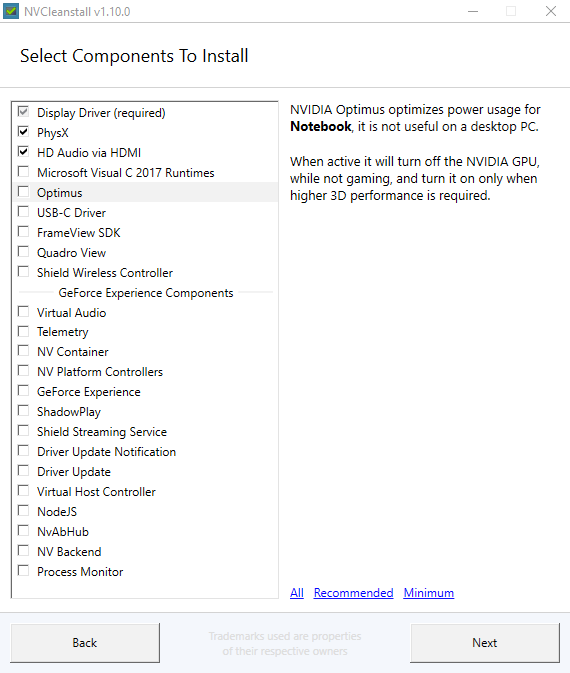
For laptops
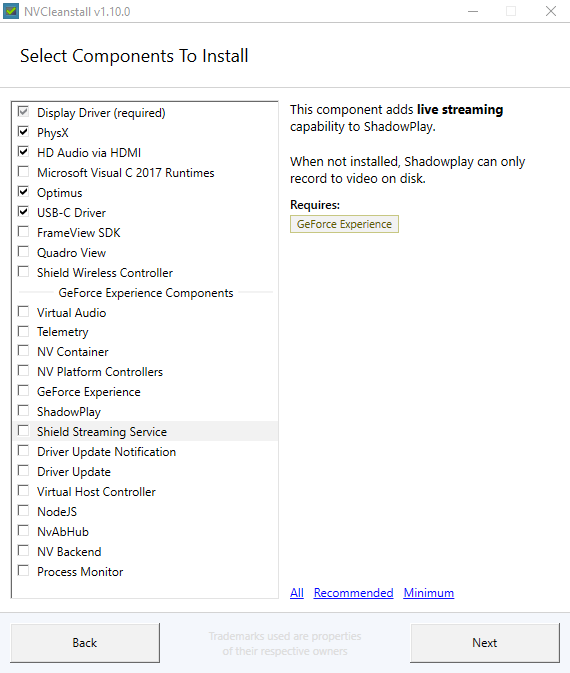
- If you want Geforce experience/Shadowplay select the modules or download your drivers from the official website, but imo these can be easily replicated and they just add unwanted telemtry and use up resources
Some laptops require the usb-c module for the optimus to work, Turing and above.
- These remove the bloat that is installed with nvidia drivers and the background services
AMD/Intel
I haven’t have had any device from AMD but the general consensus is to use the official installer as it’s pretty good
Intel Update Assistant is preferred. Install it, upgrade your drivers and uninstall it
Most other drivers will be installed by windows update, unless you have a specific hardware of which you have to do your own research